Free during the beta. Atlascope is in development: join now and use all nine tools at no cost.Request access

CtExplorer · qPCR and primer design

Design, lay out and analyse a qPCR run

Primers designed on the gene, the plate laid out with its mixes, then the run analysed: efficiency, relative expression and statistics.

Request access Open CtExplorer

Version 11.0.6, released 6 November 2026. One account for the whole suite; during the beta, access is switched on by hand, usually within a day.
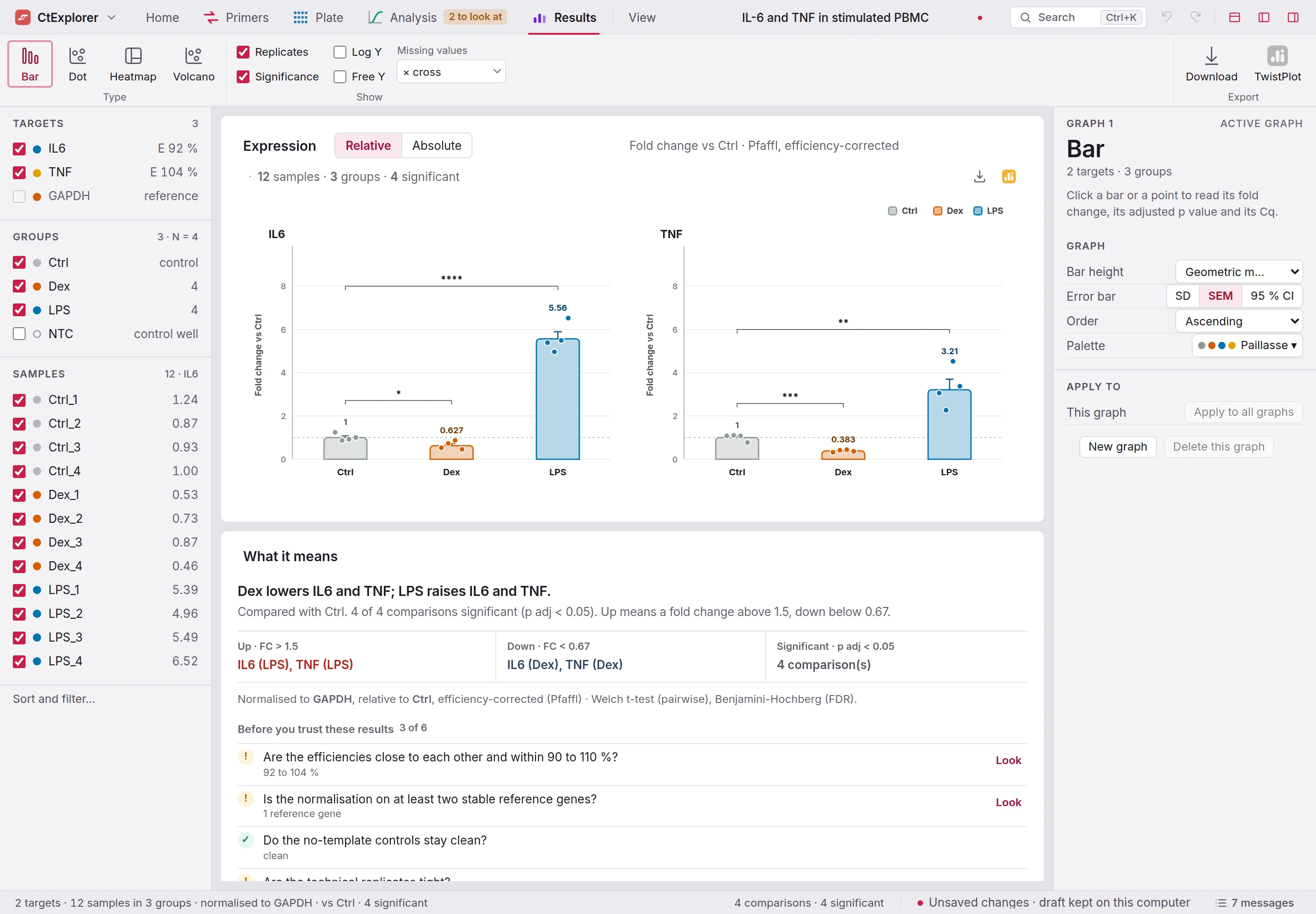
CtExplorer on the example run: Home, Primers, Plate, Analysis and Results in the menu bar, the Results ribbon with Bar, Dot, Heatmap and Volcano, the fold changes of IL6 and TNF against Ctrl by the Pfaffl method with their significance brackets, LPS at 5.56 and 3.21, and What it means with the questions to answer before you trust the results.
IL6 and TNF against Ctrl, Pfaffl, with significance brackets.

CtExplorer

What it does

Home, Primers, Plate, Analysis and Results are pages in the menu bar, each with its own ribbon. Each screen below is the app as it runs, photographed on its examples.

Primers · from a gene symbol to an assay

Primers that know where the exons are

Type a gene symbol: the pairs come back ranked, drawn on the exons.
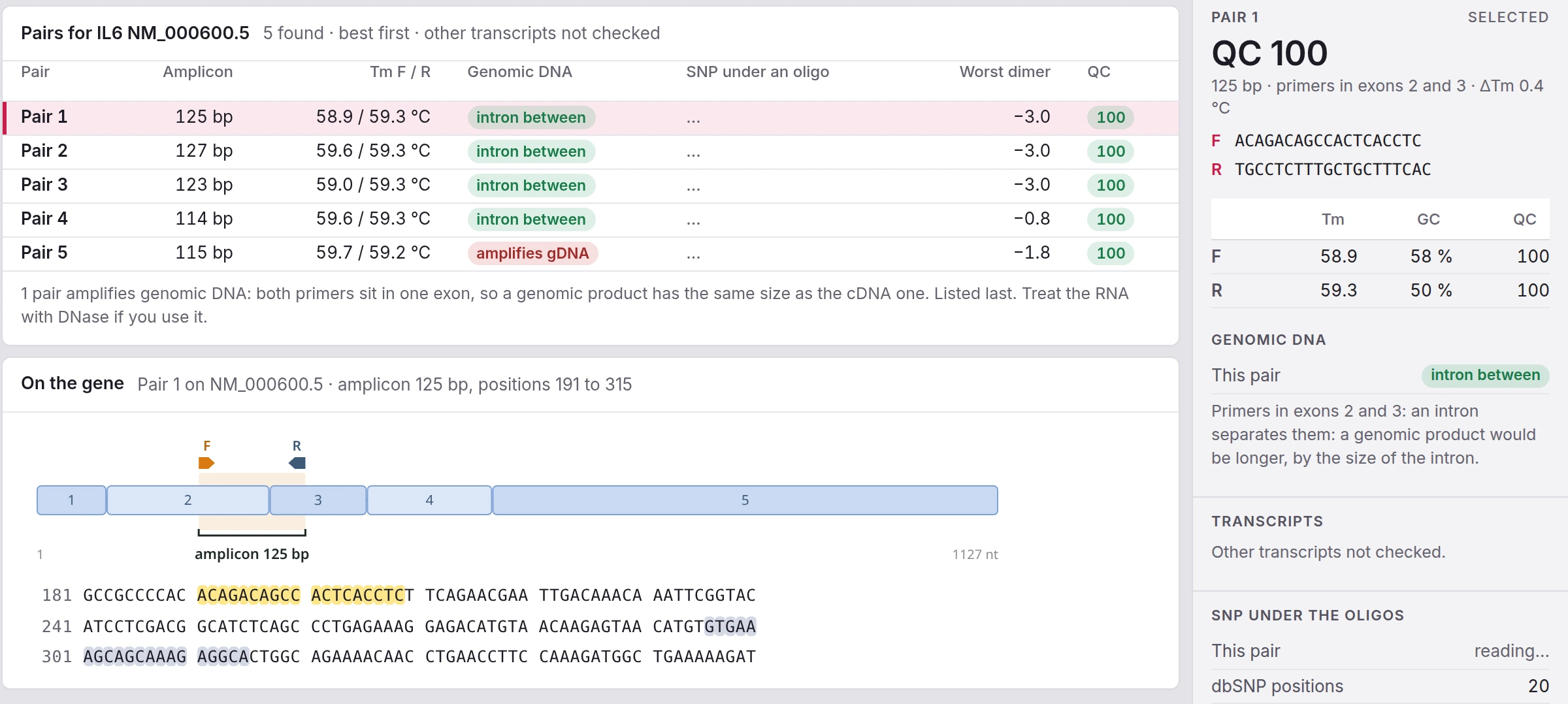
Five pairs found for IL6 on NM_000600.5, best first, with amplicon, melting temperatures, what each does with genomic DNA, SNPs under the oligos, the worst dimer and a QC score; pair 1 drawn on the five exons of the gene with its 125 bp amplicon and the sequence below, and its card on the right, primers in exons 2 and 3 with an intron between them.
Five primer pairs for IL6

Plate · the layout, the mixes, the file

A plate laid out in one go, with every volume

Quick fill places samples, targets and controls, and every mix gets its volumes.
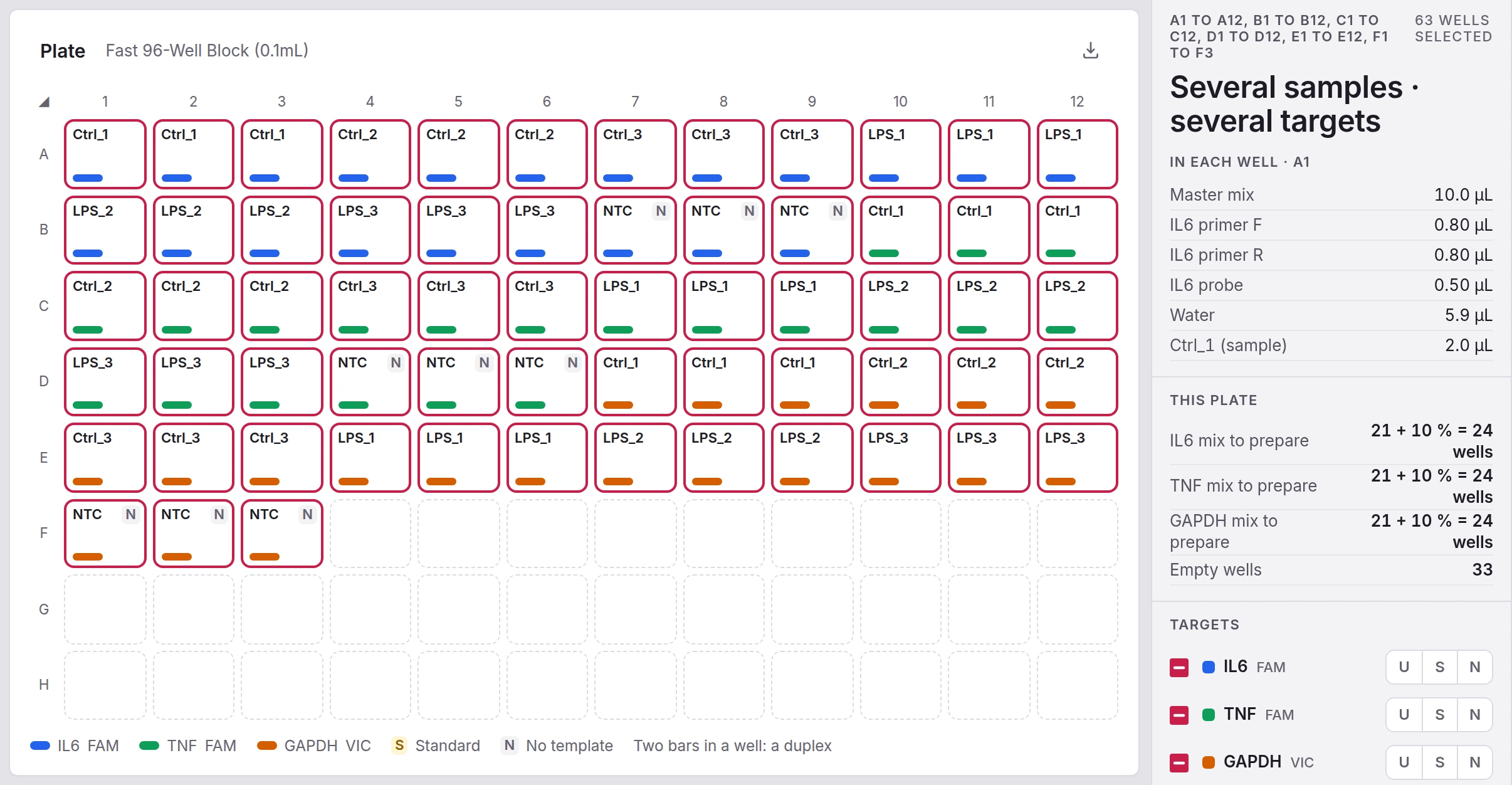
A 96-well TaqMan plate filled by Quick fill: six samples in triplicate for IL6, TNF and GAPDH, each well named with a coloured bar per target, the no-template controls marked N, and the panel on the right with the volumes in each well and the three mixes to prepare.
A 96-well TaqMan plate

Analysis · fold change against the control group

The curve first, the expression after

One standard curve per target, then fold changes with the test and a sentence that says what they mean.
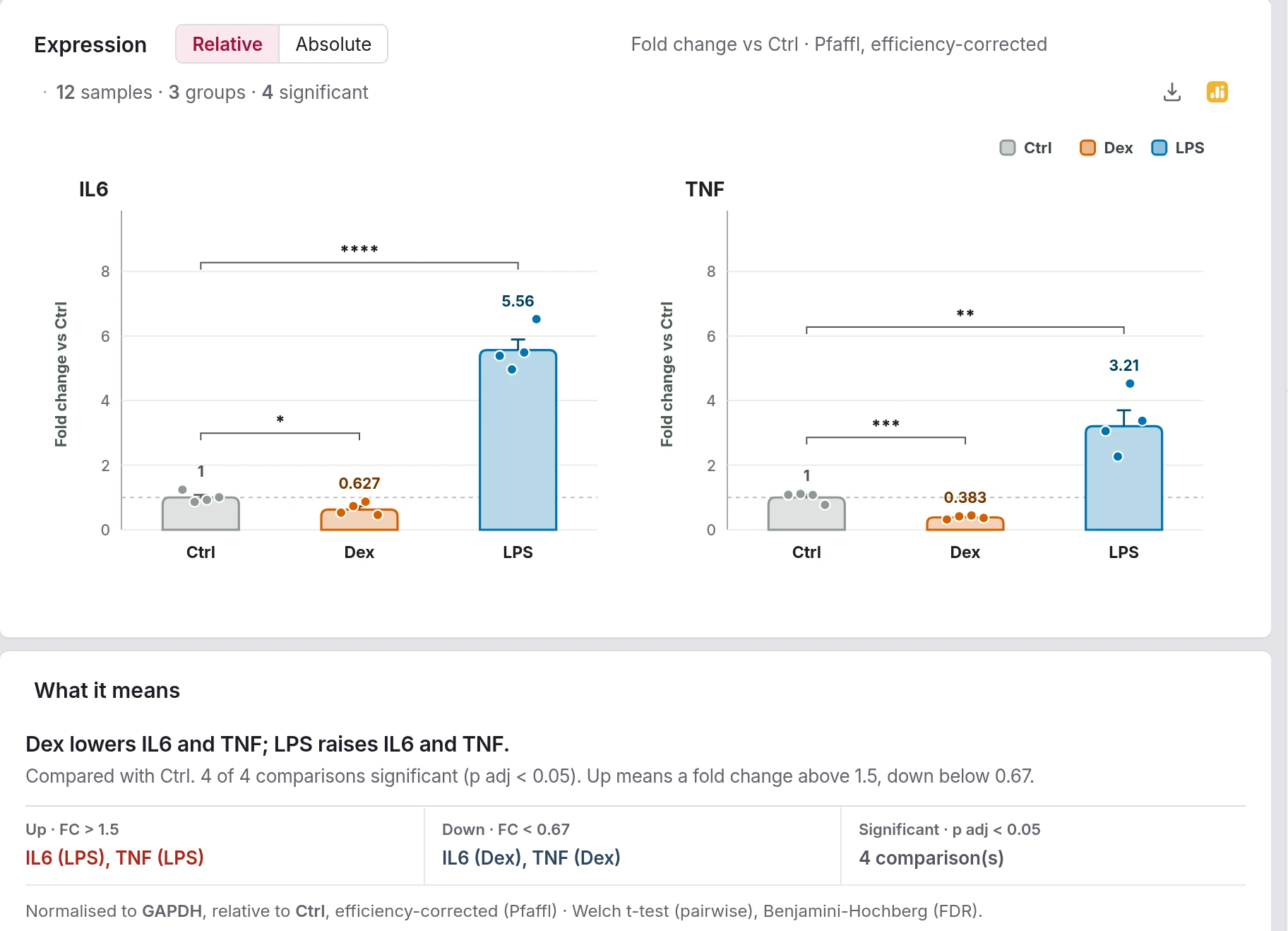
Expression of IL6 and TNF as fold change against Ctrl, Pfaffl and efficiency-corrected, twelve samples in three groups with their brackets, and What it means: Dex lowers IL6 and TNF, LPS raises them, four of four comparisons significant, normalised to GAPDH, Welch t-test with Benjamini-Hochberg.
Expression of IL6 and TNF

Version 11.0.6

Specifications

What CtExplorer reads, writes and computes, as of version 11.0.6.

Show all 9 specifications
Input
Instrument exports as xlsx, xls, csv, tsv or txt (QuantStudio, StepOne and 7500, CFX Maestro, LightCycler 480), RDML, a plate plan from Plaquo, columns pasted from Excel, .ctx.
Output
Tables as XLSX or CSV; figures as SVG, PNG or PDF; an A4 report as PDF; the raw data as RDML; oligos as FASTA; the plate setup as a QuantStudio .txt; everything in one zip; the plate to Plaquo and the results to TwistPlot.
Primer design
Primers on the gene that skip genomic DNA, exon positions in view, SNPs under the oligos from dbSNP and gnomAD, a pool matrix.
Plate setup
Layout, mixes with their volumes, 96 or 384 wells, quadrants, sessions and the cDNA source plate; a printable bench sheet.
Analysis
One standard curve per target, efficiency, Cq quality rules, reference genes, relative expression against the control group (Pfaffl or 2^-ddCt) or absolute copies, the test and its correction, two-factor plans by two-way ANOVA with Dunnett.
Quality rules
Replicates, late Cq, no-template controls, melt curves, efficiency, range of the standards, reference genes, each with its threshold and what it found.
Where the data lives
The run is read on your computer. The analysis saves to your account or to a .ctx file, with a draft kept in the browser.
Verification
7 291 comparisons with R at every build: quantification, melting temperatures and statistics.
Runs in
A current browser; installs as an app with its own window, where a .ctx file opens by double click.

What changed

Release notes

CtExplorer, last 3 releases. The full list, by tool and by version, is on the release notes page of getatlascope.com.

All release notes

Access

Getting in

CtExplorer is one of the nine tools of Atlascope. One account opens all of them. During the beta, we switch new accounts on by hand, usually within a day.

Bring the run that is still open in Excel.

The curves are fitted the moment you validate the columns, and you will know whether the run is worth normalising.

One account for CtExplorer and the whole Atlascope suite. If you already have one, sign in. Forgot your password?

Signed in as

Your Atlascope workspace · Sign out

Atlascope

The other eight tools

Same account, same way of working.

All nine tools on getatlascope.com